


碎碎念
首先的话,我发现这个小手机,似乎底层是没有打断电源充电的功能的,只要插上数据线就会一直充电,这一点的话就是很麻烦了,因为如果长期出去较高的电量的话,电池毫无疑问,又会鼓包了,但是如果不充电的话,又懒得频繁去插拔数据线,(而且不时还会忘记充电导致关机),上了ACC也是没用的,好像底层就不支持,但是我翻遍了底层的文件,发现了两个有意思的开关
首先的话就是
/sys/class/power_supply/battery/current_now 这个是可以获取当前的充电电流的

另一个是
/proc/charger/force_current_limit 这个的功能就是可以调节最大的充电电流的。
那么问题就来了,你说没有开关,你设置为0电流不就是可以了嘛,很明显是不可以的。
因为系统默认就是设置为0,就是默认充电电流
经过很多次试验,当/sys/class/power_supply/battery/current_now ,为正数是电池正在耗电,正在消耗
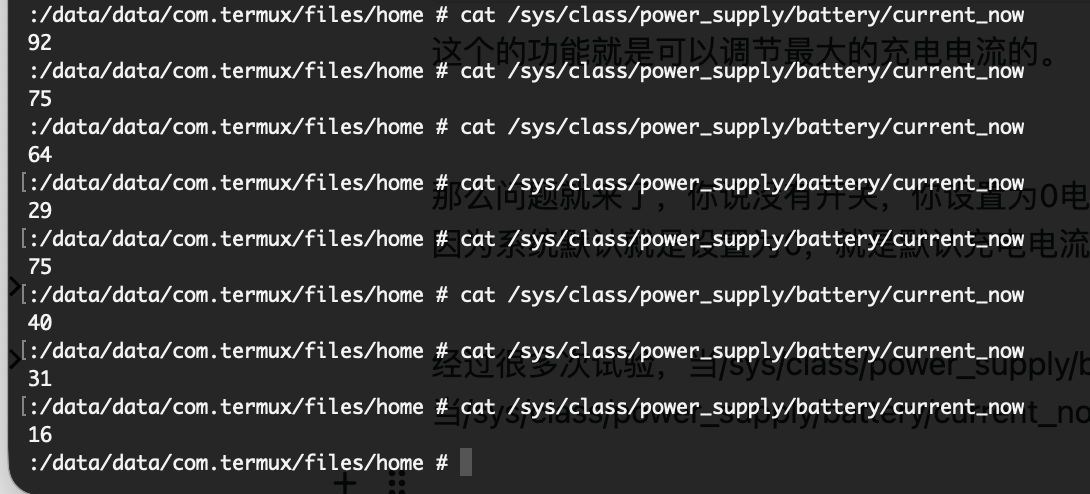
当/sys/class/power_supply/battery/current_now ,为负数的时候,电池正在充电
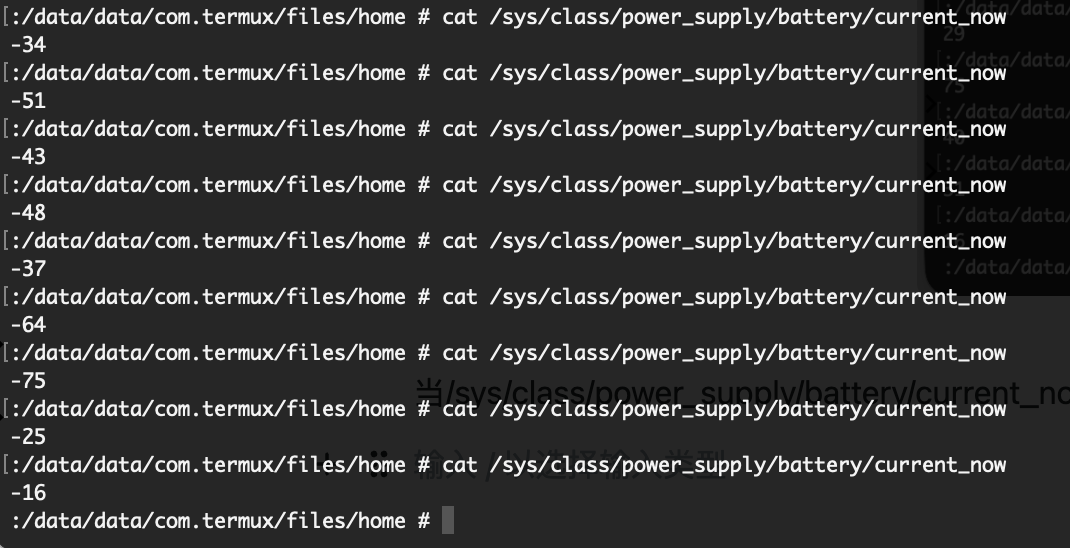
并且,不能设置为负数,也就是这个数值最小只能设置为1,这就是充电的最小电流

但是呢,因为系统控制原因,不可能达到这么惊喜的电源控制,只是把档位调整为最小,但是实际上依旧有电流源源不断的充电
那么就只能再打开手机自带的GT模式+手电筒
这样的话,就可以很好的实现功耗上涨,抵消掉涓流充电,实现在这个档位减少电量。
然后就可以实现,在电量较低的时候进行充电,将电流档位跳高,电量较高的时候,将档位调低,进行消耗电量。
具体代码实现
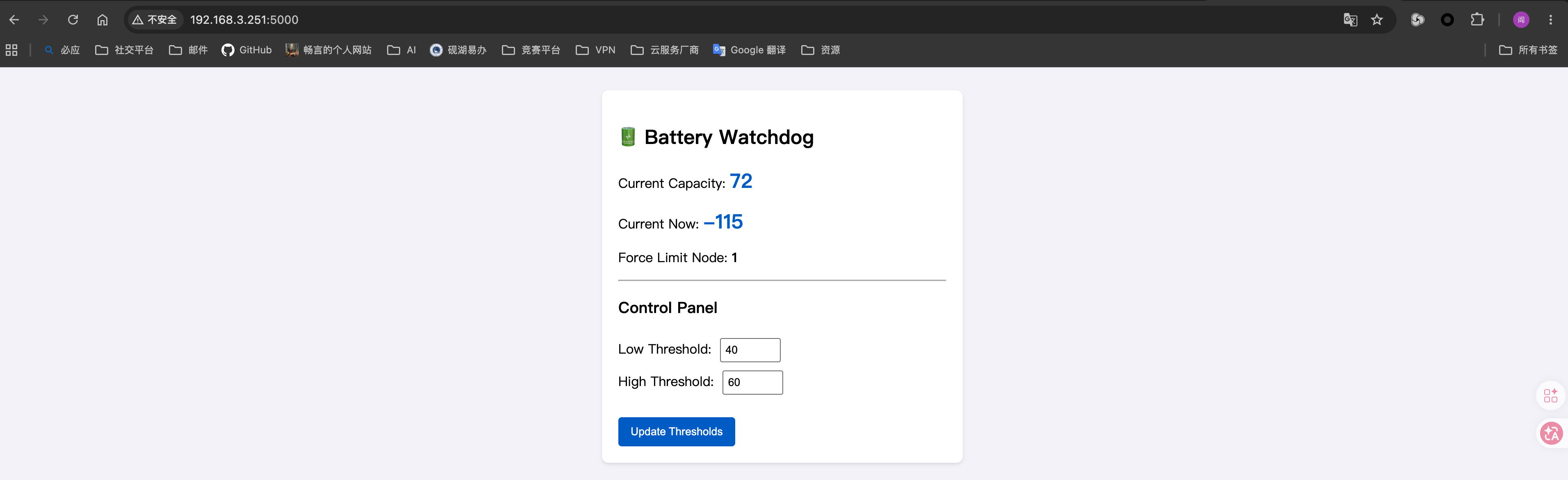
import os
import sys
import time
import threading
import fcntl
from flask import Flask, request, jsonify, render_template_string

# --- 单例模式锁 ---
LOCK_FILE = "/data/data/com.termux/files/home/battery_server.lock"
try:
    lock_fd = open(LOCK_FILE, 'w')
    fcntl.lockf(lock_fd, fcntl.LOCK_EX | fcntl.LOCK_NB)
except IOError:
    print("⚠️ Battery Watchdog is already running. Exiting...")
    sys.exit(0)

# --- Root 权限检查 ---
if os.geteuid() != 0:
    print("❌ This script must be run as root! Please use 'tsu' or 'sudo'.")
    sys.exit(1)

app = Flask(__name__)

# 底层节点路径
CAPACITY_NODE = "/sys/class/power_supply/battery/capacity"
CURRENT_NOW_NODE = "/sys/class/power_supply/battery/current_now"
LIMIT_NODE = "/proc/charger/force_current_limit"

config = {
    "high_threshold": 80,
    "low_threshold": 20
}

def read_node(path):
    try:
        with open(path, "r") as f:
            return int(f.read().strip())
    except Exception:
        return 0

def write_node(path, val):
    try:
        with open(path, "w") as f:
            f.write(str(val))
    except Exception as e:
        print(f"Write error: {e}")

def initialize_charge_state():
    """确保启动时 limit 节点为 1 或 1000"""
    cap = read_node(CAPACITY_NODE)
    current_limit = read_node(LIMIT_NODE)
    if current_limit in (1, 1000):
        print(f"Init: Limit already valid ({current_limit}), no change.")
        return

    target = 1 if cap >= config["high_threshold"] else 1000
    print(f"Init: Current limit is {current_limit}, setting to {target}...")
    write_node(LIMIT_NODE, target)
    time.sleep(0.2)

    new_limit = read_node(LIMIT_NODE)
    if new_limit != target:
        print(f"❌ FATAL: Failed to set limit to {target}. Read back {new_limit}. "
              "Check root or kernel support.")
        sys.exit(1)
    print(f"✅ Init: Successfully set limit to {target}.")

# --- 后台看门狗线程 ---
def watchdog_loop():
    while True:
        cap = read_node(CAPACITY_NODE)
        current_limit = read_node(LIMIT_NODE)

        if cap >= config["high_threshold"]:
            if current_limit != 1:
                write_node(LIMIT_NODE, 1)
                print(f"Capacity {cap}. Stop charge (Limit=1).")
        elif cap <= config["low_threshold"]:
            if current_limit != 1000:
                write_node(LIMIT_NODE, 1000)
                print(f"Capacity {cap}. Start charge (Limit=1000).")

        time.sleep(2)

# --- Web UI 与 API ---
HTML_TEMPLATE = """
<!DOCTYPE html>
<html>
<head>
    <title>Battery Homelab Watchdog</title>
    <meta name="viewport" content="width=device-width, initial-scale=1">
    <style>
        body { font-family: -apple-system, sans-serif; padding: 20px; background: #f4f4f9; }
        .card { background: white; padding: 20px; border-radius: 8px; box-shadow: 0 2px 4px rgba(0,0,0,0.1); max-width: 400px; margin: 0 auto; }
        .stat { font-size: 24px; font-weight: bold; color: #0066cc; }
        input { width: 60px; padding: 5px; margin: 5px; }
        button { background: #0066cc; color: white; border: none; padding: 10px 15px; border-radius: 4px; cursor: pointer; }
        button:hover { background: #0052a3; }
    </style>
</head>
<body>
    <div class="card">
        <h2>🔋 Battery Watchdog</h2>
        <p>Current Capacity: <span class="stat" id="capacity">{{ cap }}</span></p>
        <p>Current Now: <span class="stat" id="current_ma">{{ current_ma }}</span></p>
        <p>Force Limit Node: <b id="limit_val">{{ limit_val }}</b></p>
        <hr>
        <h3>Control Panel</h3>
        <form action="/update" method="post">
            <label>Low Threshold: </label>
            <input type="number" name="low" value="{{ low }}" max="90" min="5"><br>
            <label>High Threshold: </label>
            <input type="number" name="high" value="{{ high }}" max="100" min="10"><br><br>
            <button type="submit">Update Thresholds</button>
        </form>
    </div>
    <script>
        // 自动刷新数据,但不覆盖用户正在编辑的输入框
        setInterval(function() {
            fetch('/status')
                .then(response => response.json())
                .then(data => {
                    document.getElementById('capacity').textContent = data.cap;
                    document.getElementById('current_ma').textContent = data.current_ma;
                    document.getElementById('limit_val').textContent = data.limit_val;
                    // 注意:这里故意不更新表单的 input,避免干扰用户输入
                })
                .catch(error => console.error('Status update error:', error));
        }, 2000);
    </script>
</body>
</html>
"""

@app.route("/")
def index():
    cap = read_node(CAPACITY_NODE)
    current_ma = read_node(CURRENT_NOW_NODE)
    limit_val = read_node(LIMIT_NODE)

    return render_template_string(
        HTML_TEMPLATE,
        cap=cap,
        current_ma=current_ma,
        limit_val=limit_val,
        low=config["low_threshold"],
        high=config["high_threshold"]
    )

@app.route("/status")
def status():
    return jsonify({
        "cap": read_node(CAPACITY_NODE),
        "current_ma": read_node(CURRENT_NOW_NODE),
        "limit_val": read_node(LIMIT_NODE),
        "low": config["low_threshold"],
        "high": config["high_threshold"]
    })

@app.route("/update", methods=["POST"])
def update():
    try:
        new_low = int(request.form.get("low"))
        new_high = int(request.form.get("high"))
        if new_low < new_high:
            config["low_threshold"] = new_low
            config["high_threshold"] = new_high
    except:
        pass
    return index()

if __name__ == "__main__":
    initialize_charge_state()
    t = threading.Thread(target=watchdog_loop, daemon=True)
    t.start()
    app.run(host="0.0.0.0", port=5000, threaded=True, use_reloader=False)